Overview
DHL Express Commerce allows you to specify different registration and/or tax numbers that may be applicable to the shipment for custom clearance.
Registration numbers can be configured for the shipper, receiver and sold to addresses.
Shipper Registration and Tax Number Setup
- Go to Settings, Options, Shipper Tax Settings
- Click Add new
- Select the tax or registration number type using the Tax Type drop down
- Set the Tax Number
- Set the Destination Country or Region where this tax number should be used
- Click Add

Sold To Registration and Tax Number Setup
- Go to Settings, Options, Sold To Addresses
- Click Add new or Edit an existing Sold To address.
- Scroll to the Tax Settings table at the bottom of the screen
- Select Add new
- Select the tax number type using the Tax Type drop down
- Set the Tax Number
- Set the Destination Country or Region where this tax number should be used
- Click Add
Supported Registration and Tax Numbers
Registration Type Code |
Registration Type Name |
|
EORI |
Economic Operator registration ID |
|
IOSS |
Import One-Stop-Shop |
|
LVG |
Overseas Registered Supplier |
|
OSR |
AUSid GST Registration |
|
VOEC |
VAT on E-Commerce |
|
VAT/GST |
VAT Registration |
|
FTZ |
Free Trade Zone ID |
|
DAN |
Deferment Account Duties Only |
|
TAN |
Deferment Account Tax Only |
|
DTF |
Deferment Account Duties, Taxes and Fees Only |
|
EIN |
Employer Identification Number |
|
SSN |
Social Security Number |
|
DUN |
Data Universal Numbering System |
|
FED |
Federal Tax ID |
|
STA |
State Tax ID |
|
CNP |
Brazil CNPJ/CPF Federal Tax |
|
GBVAT |
GB VAT (foreign) registration |
Receiver Tax Numbers
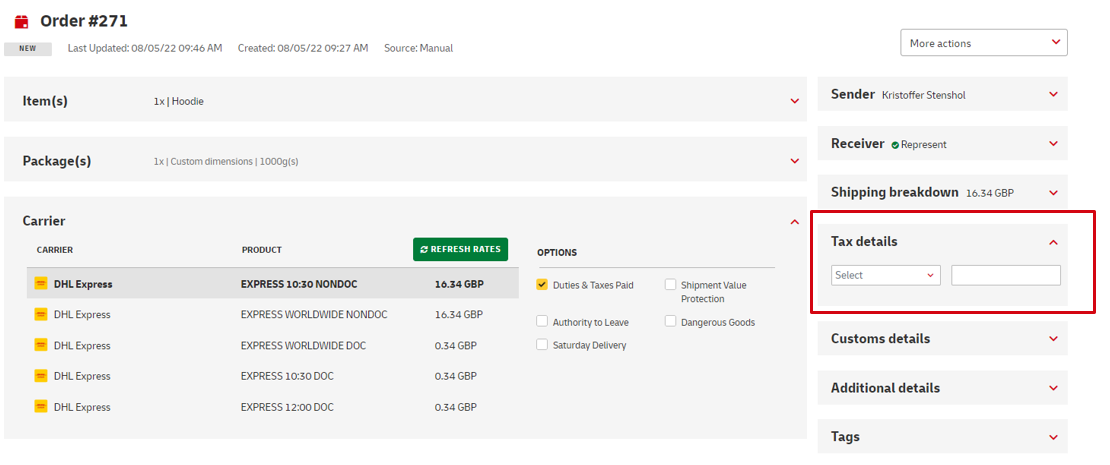
When creating your shipment label, it is possible to specify a VAT or EORI number for the receiver.
- Open an order from the New Tab for printing
- Expand the Tax module
- Set the tax type from the drop down menu
Registration Type Code
Registration Type Name
EORI
Economic Operator registration ID
CNP
Cadastro Nacional de Pessoas Jurídicas (Brazil)
VAT
VAT registration
CR
Customs Registration Number (China)
USCI
Unified Social Credit Identifier (China)
National ID
National ID number (any destination)
Drivers Licence
Drivers Licence number (any destination)
Passport Number
Passport Number (any destination)
- Input the tax number